

6 Tagging
Overview
Tags consist of a tag name and a tag value.
When tagging entities, you can use just the name or pair it with a value (for example, mysql, jira, target:mysql, service:jira, etc.).
Tags can be defined for various entities:
- Templates
- Hosts
- Items
- Web scenarios
- Triggers
- Services
- Template items and triggers
- Host, item, and trigger prototypes
In the Templates, Hosts, Items, Triggers, Web scenarios lists and their prototypes the Tags column displays both regular and inherited tags. When hovering over or clicking an inherited tag a JavaScript tooltip appears with the text "Inherited tag". If an inherited tag also exists as a regular tag, a different tooltip text is shown depending on the list where it appears (for example, "Inherited and template tag" in the templates list or "Inherited and host tag" in the hosts list). In other places of the frontend regular and inherited tags are displayed together (duplicates are removed), without icons and without additional tooltip text.
Refer to the official Zabbix guidelines for general recommendations on defining tags, along with specific guidance for templates, items, triggers, and low-level discovery rules.
Tags have multiple purposes, most notably, to mark events. When entities are tagged, any new event related to a tagged entity will inherit its tags. For example:
- with tagged templates - any host problem (created by triggers from the template) will inherit the template tags.
- with tagged hosts - any host problem will inherit the host tags.
- with tagged items/web scenarios - any item/web scenario problem will inherit the item/web scenario tags.
- with tagged triggers - any problem created by the trigger will inherit the trigger tags.
A problem event inherits all tags from the whole chain of entities - templates, hosts, items/web scenarios, triggers.
Identical tag:value combinations (after resolved macros) are merged into one, thus avoiding duplication.
Recovery events generated by a manual close also include the resolved event tags inherited from templates, hosts, items/web scenarios and triggers.
These tags are available in notifications and via macros such as {EVENT.RECOVERY.TAGS} and {EVENT.RECOVERY.TAGSJSON}.
Custom event tags offer more flexibility. For example:
- event correlation can be configured based on event tags.
- action conditions can be configured based on event tags.
- item problems can be grouped based on event tags.
- problem tags can be used to map problems to services.
Entities may be tagged with the same tag name but different tag values (for example, component:memory and component:storage).
Similarly, an entity can have a tag without a value and the same tag with a value (for example, database and database:postgresql).
Such tags are not considered duplicates.
Use cases
Some common use cases for tagging are as follows:
-
Mark trigger events:
- Define a trigger tag (for example,
scope:performance). - Problems created by this trigger will have the trigger tag.
- Define a trigger tag (for example,
-
Mark template-inherited problems:
- Define a template tag (for example,
target:mysql). - Problems created by triggers from this template will have the template tag.
- Define a template tag (for example,
-
Mark host problems:
- Define a host tag (for example,
service:jira). - Problems created by triggers from this host will have the host tag.
- Define a host tag (for example,
-
Filter related items:
- Define an item tag (for example,
component:cpu). - In Monitoring > Latest data, items can be filtered by the
component:cputag.
- Define an item tag (for example,
-
Use information extracted from the item value as the tag value:
- Define a tag with a macro as the tag value (for example,
tag-name:{{ITEM.VALUE<N>}.regsub()}). - In Monitoring > Problems, problems will have the tag value resolved to the data extracted from the item value.
- Define a tag with a macro as the tag value (for example,
-
Identify problems in a log file and close them separately:
- Define a trigger tag for the log monitoring item trigger that will extract values from the item value using a macro (for example,
service:{{ITEM.VALUE<N>}.regsub()}). - In the trigger configuration, set up event correlation:
- set PROBLEM event generation mode to "Multiple";
- set OK event closes to "All problems if tag values match";
- set the tag for matching.
- Problems created by the log item trigger will have the trigger tag and will be closed individually.
- Define a trigger tag for the log monitoring item trigger that will extract values from the item value using a macro (for example,
-
Filter notifications:
- Define trigger tags (for example,
scope:securityfor trigger1 andscope:availabilityfor trigger2). - Use tag filtering in action conditions to receive notifications only on the events that match tag data.
- Define trigger tags (for example,
-
Identify problems in notifications:
- Define trigger tags.
- Use the {EVENT.TAGS} macro in the problem notification.
- The problem notification will contain the trigger tags, making it easier to identify which application/service the notification belongs to.
-
Simplify configuration tasks by using template tags:
- Define a template trigger tag.
- Triggers created from this template trigger will have its tag.
-
Create triggers with tags from low-level discovery (LLD):
- Define a trigger prototype tag with an LLD macro in the tag name or value (for example,
scope:{#FSNAME}). - Triggers created from the trigger prototype will have its tag.
- Define a trigger prototype tag with an LLD macro in the tag name or value (for example,
-
Match services using service tags:
- Define service tags.
- Configure service actions for services with matching tags.
- Additionally, use service tags to link a service to an SLA for SLA calculations.
-
Link services to problems using service problem tags:
- Define a problem tag in service configuration (for example,
target:mysql). - Problems with a matching tag will be automatically correlated to the service, and service status will change based on the configured service status calculation rules.
- Define a problem tag in service configuration (for example,
-
Suppress problems when a host is in maintenance mode:
- Define tags in maintenance period configuration.
- Problems with the defined tags will be suppressed.
-
Grant access to user groups:
- Define tags in user group configuration.
- Users in the user group will be able to view only problems with the defined tags.
Configuration
Tags can be defined in a dedicated tab, for example, in trigger configuration:
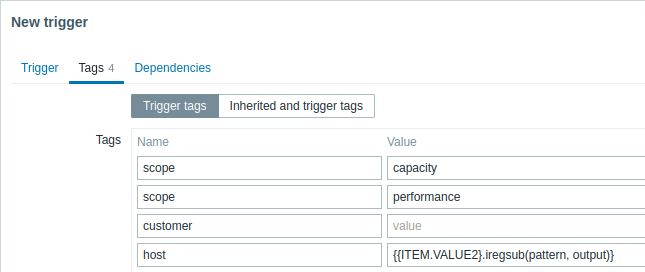
Macro support
Built-in and user macros in tags are resolved at the time of the event. Until the event has occurred, these macros will be shown in Zabbix frontend unresolved.
Low-level discovery macros are resolved during discovery process.
The following macros may be used in trigger tag names and values:
- {ITEM.VALUE}, {ITEM.VALUE.AGE}, {ITEM.VALUE.DATE}, {ITEM.VALUE.TIME}, {ITEM.VALUE.TIMESTAMP}, {ITEM.LASTVALUE}, {ITEM.LASTVALUE.AGE}, {ITEM.LASTVALUE.DATE}, {ITEM.LASTVALUE.TIME}, {ITEM.LASTVALUE.TIMESTAMP}, {HOST.HOST}, {HOST.NAME}, {HOST.CONN}, {HOST.DNS}, {HOST.IP}, {HOST.PORT}, and {HOST.ID} built-in macros
- {INVENTORY.*} built-in macros (for referencing host inventory values from one or several hosts in a trigger expression)
- User macros and user macros with context (the context may include low-level discovery macros)
- Low-level discovery macros (only in trigger prototype tags)
The following macros may be used in template, host, and item/web scenario tag names and values:
- {HOST.HOST}, {HOST.NAME}, {HOST.CONN}, {HOST.DNS}, {HOST.IP}, {HOST.PORT} and {HOST.ID} built-in macros
- {INVENTORY.*} built-in macros
- User macros
- Low-level discovery macros (only in host and item prototype tags)
The following macros may be used in trigger-based notifications:
- {EVENT.TAGS} and {EVENT.RECOVERY.TAGS} built-in macros (these macros will resolve to a comma-separated list of event tags or recovery event tags)
- {EVENT.TAGSJSON} and {EVENT.RECOVERY.TAGSJSON} built-in macros (these macros will resolve to a JSON array containing event tag objects or recovery event tag objects)
Substring extraction in trigger tags
Substring extraction is supported for populating the tag name or tag value, using a macro function. The function applies a regular expression to the value obtained by the supported macro. For example:
{{ITEM.VALUE}.regsub(pattern, output)}
{{ITEM.VALUE}.iregsub(pattern, output)}

{{#LLDMACRO}.regsub(pattern, output)}
{{#LLDMACRO}.iregsub(pattern, output)}
If the tag name or value exceeds 255 characters after macro resolution, it will be truncated to 255 characters.
See also: Using macro functions in low-level discovery macros for event tagging.
Viewing event tags
Tags, if defined, can be viewed with new events in:
- Monitoring > Problems
- Monitoring > Problems > Event details
- Dashboards > Problems widget
The order and number of displayed tags is determined by the Tag display priority and Show tags filtering options in Monitoring > Problems or the Problems dashboard widget. Note that a maximum of three tags can be displayed; if there are more tags, hovering over the three dots reveals all tags in a pop-up window.
