
On this page
Item menu
Overview
The item menu contains shortcuts to actions or frontend sections that are frequently required for an item.
The item menu can be opened by clicking the item name or the three-dot icon, depending on the frontend section, for example:
Monitoring > Latest data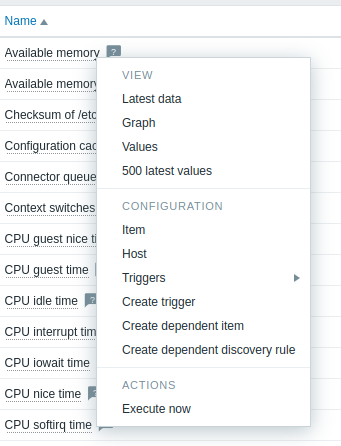 |
Data Collection > Templates > Items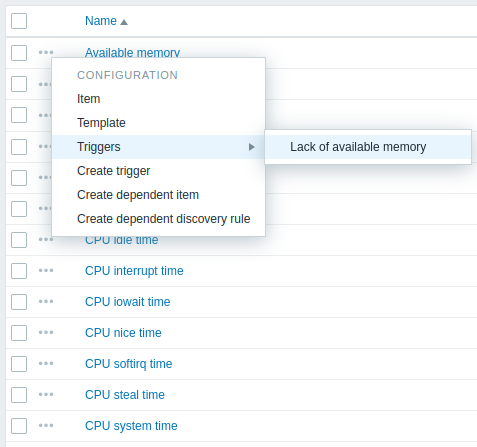 |
Content
The item menu has three sections: View, Configuration, and Actions.
The View section contains the following options:
- Latest data - opens the Latest data section filtered by the current host and item;
- Graph - opens a simple graph of the current item;
- Values - opens the list of all values received for the current item within the past 60 minutes;
- 500 latest values - opens the list of 500 latest values for the current item.
The Configuration section (available only for Admin and Super admin type users) contains the following options:
- Item - opens the item configuration form of the current item;
- Template - opens the template configuration form of the template that the item belongs to (available only when the item menu is accessed from Data collection > Templates > Items);
- Host - opens the host configuration form of the host that the item belongs to;
- Triggers - on mouseover, opens a list of item's triggers, if any; clicking a trigger opens its trigger configuration form;
- Create trigger - opens the trigger configuration form to create a trigger for this item;
- Create dependent item - opens the item configuration form to create a dependent item, with the current item as the master item;
- Create dependent discovery rule - opens the discovery rule configuration form to create a dependent discovery rule, with the current item as the master item.
The Actions section contains the following option:
- Execute now - executes a check for a new item value immediately.
Supported locations
The item menu is accessible by clicking an item name in various frontend sections, for example:
- Monitoring > Latest data
- Data collection > Hosts > Items
- Data collection > Hosts > Discovery rules > Item prototypes
The item menu is accessible by clicking an item value in the Top items dashboard widget.