
Discovery
Overview
In the Monitoring > Discovery section results of network discovery are shown. Discovered devices are sorted by the discovery rule.
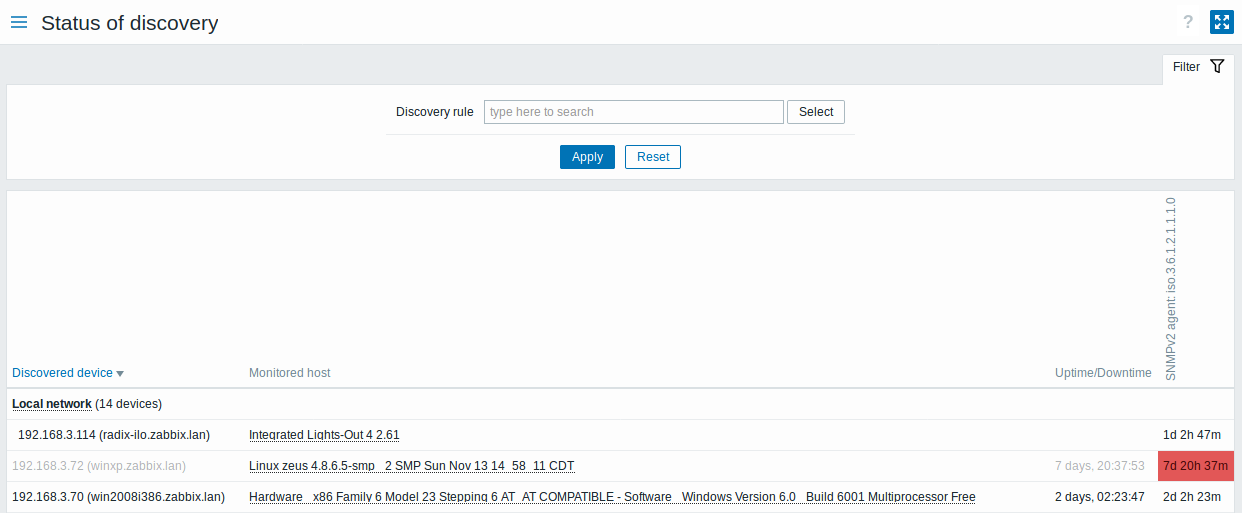
Displayed data:
| Column | Description |
|---|---|
| Discovered device | Discovered devices are listed, grouped by the discovery rule. Clicking the discovery rule brings up the rule menu containing the link to the discovery rule configuration form. If a device has several IP addresses (as determined by the Device uniqueness criteria of the discovery rule), they are listed together: the primary IP address of the device first, followed by its other IP addresses (indented). The primary IP address is the lowest IP address that has a host listed in the Monitored host column or, if there is no such address, the lowest IP address of the device. Devices can be sorted by their primary IP address in ascending or descending order; the other IP addresses of a device are always listed below its primary IP address, in ascending order. |
| Monitored host | If a device is already monitored, the host name will be listed in this column. Clicking the host name brings up the host menu. |
| Uptime/Downtime | The duration of the device being discovered or lost after previous discovery is displayed in this column. For a device with several IP addresses, the duration is displayed only for its primary IP address. |
| Discovery check | The state of the individual service (discovery check) for each discovered device is displayed. A red cell shows that the service is down. Service uptime or downtime is included within the cell. This column is displayed only if the service has been found on at least one discovered device. |
The number of discovery rules and the total number of discovered devices displayed in this section are limited by the Limit for search and filter results parameter in Administration > General > GUI. Rules or devices exceeding the limit are not displayed, and no indication of this is shown.
Buttons
View mode buttons being common for all sections are described on the Monitoring page.
Using filter
You can use the filter to display only the discovery rules you are interested in. For better search performance, data is searched with macros unresolved.
With nothing selected in the filter, all enabled discovery rules are displayed. To select a specific discovery rule for display, start typing its name in the filter. All matching enabled discovery rules will be listed for selection. More than one discovery rule can be selected.