
- 1 Using certificates
- Overview
- Certificate configuration parameters
- Configuration examples
- Configuring certificate on Zabbix server
- Configuring certificate-based encryption for Zabbix proxy
- Configuring certificate-based encryption for Zabbix agent
- Restricting allowed certificate Issuer and Subject
- Limitations on using X.509 v3 certificate extensions
- Certificate Revocation Lists (CRL)
1 Using certificates
Overview
Zabbix can use RSA certificates in PEM format, signed by a public or in-house certificate authority (CA). Certificate verification is done against a pre-configured CA certificate. Optionally certificate revocation lists (CRL) can be used. Each Zabbix component can have only one certificate configured.
For more information how to set up and operate internal CA, how to generate certificate requests and sign them, how to revoke certificates you can find numerous online how-tos, for example, OpenSSL PKI Tutorial v1.1 .
Carefully consider and test your certificate extensions - see Limitations on using X.509 v3 certificate extensions.
Certificate configuration parameters
| Parameter | Mandatory | Description |
|---|---|---|
| TLSCAFile | * | Full pathname of a file containing the top-level CA(s) certificates for peer certificate verification. In case of certificate chain with several members they must be ordered: lower level CA certificates first followed by certificates of higher level CA(s). Certificates from multiple CA(s) can be included in a single file. |
| TLSCRLFile | Full pathname of a file containing Certificate Revocation Lists. See notes in Certificate Revocation Lists (CRL). | |
| TLSCertFile | * | Full pathname of a file containing certificate (certificate chain). In case of certificate chain with several members they must be ordered: server, proxy, or agent certificate first, followed by lower level CA certificates then certificates of higher level CA(s). |
| TLSKeyFile | * | Full pathname of a file containing private key. Set access rights to this file - it must be readable only by Zabbix user. |
| TLSServerCertIssuer | Allowed server certificate issuer. | |
| TLSServerCertSubject | Allowed server certificate subject. | |
Configuration examples
After setting up the necessary certificates, configure Zabbix components to use certificate-based encryption.
Below are detailed steps for configuring:
Configuring certificate on Zabbix server
1. In order to verify peer certificates, Zabbix server must have access
to file with their top-level self-signed root CA certificates. For
example, if we expect certificates from two independent root CAs, we can
put their certificates into file /home/zabbix/zabbix_ca_file like
this:
Certificate:
    Data:
        Version: 3 (0x2)
        Serial Number: 1 (0x1)
    Signature Algorithm: sha1WithRSAEncryption
        Issuer: DC=com, DC=zabbix, O=Zabbix SIA, OU=Development group, CN=Root1 CA
            ...
        Subject: DC=com, DC=zabbix, O=Zabbix SIA, OU=Development group, CN=Root1 CA
        Subject Public Key Info:
            Public Key Algorithm: rsaEncryption
                Public-Key: (2048 bit)
            ...
        X509v3 extensions:
            X509v3 Key Usage: critical
                Certificate Sign, CRL Sign
            X509v3 Basic Constraints: critical
                CA:TRUE
            ...
-----BEGIN CERTIFICATE-----
MIID2jCCAsKgAwIBAgIBATANBgkqhkiG9w0BAQUFADB+MRMwEQYKCZImiZPyLGQB
....
9wEzdN8uTrqoyU78gi12npLj08LegRKjb5hFTVmO
-----END CERTIFICATE-----
Certificate:
    Data:
        Version: 3 (0x2)
        Serial Number: 1 (0x1)
    Signature Algorithm: sha1WithRSAEncryption
        Issuer: DC=com, DC=zabbix, O=Zabbix SIA, OU=Development group, CN=Root2 CA
            ...
        Subject: DC=com, DC=zabbix, O=Zabbix SIA, OU=Development group, CN=Root2 CA
        Subject Public Key Info:
            Public Key Algorithm: rsaEncryption
                Public-Key: (2048 bit)
            ....
        X509v3 extensions:
            X509v3 Key Usage: critical
                Certificate Sign, CRL Sign
            X509v3 Basic Constraints: critical
                CA:TRUE
            ....
-----BEGIN CERTIFICATE-----
MIID3DCCAsSgAwIBAgIBATANBgkqhkiG9w0BAQUFADB/MRMwEQYKCZImiZPyLGQB
...
vdGNYoSfvu41GQAR5Vj5FnRJRzv5XQOZ3B6894GY1zY=
-----END CERTIFICATE-----
2. Put Zabbix server certificate chain into file, for example,
/home/zabbix/zabbix_server.crt:
Certificate:
    Data:
        Version: 3 (0x2)
        Serial Number: 1 (0x1)
    Signature Algorithm: sha1WithRSAEncryption
        Issuer: DC=com, DC=zabbix, O=Zabbix SIA, OU=Development group, CN=Signing CA
        ...
        Subject: DC=com, DC=zabbix, O=Zabbix SIA, OU=Development group, CN=Zabbix server
        Subject Public Key Info:
            Public Key Algorithm: rsaEncryption
                Public-Key: (2048 bit)
                ...
        X509v3 extensions:
            X509v3 Key Usage: critical
                Digital Signature, Key Encipherment
            X509v3 Basic Constraints:
                CA:FALSE
            ...
-----BEGIN CERTIFICATE-----
MIIECDCCAvCgAwIBAgIBATANBgkqhkiG9w0BAQUFADCBgTETMBEGCgmSJomT8ixk
...
h02u1GHiy46GI+xfR3LsPwFKlkTaaLaL/6aaoQ==
-----END CERTIFICATE-----
Certificate:
    Data:
        Version: 3 (0x2)
        Serial Number: 2 (0x2)
    Signature Algorithm: sha1WithRSAEncryption
        Issuer: DC=com, DC=zabbix, O=Zabbix SIA, OU=Development group, CN=Root1 CA
        ...
        Subject: DC=com, DC=zabbix, O=Zabbix SIA, OU=Development group, CN=Signing CA
        Subject Public Key Info:
            Public Key Algorithm: rsaEncryption
                Public-Key: (2048 bit)
            ...
        X509v3 extensions:
            X509v3 Key Usage: critical
                Certificate Sign, CRL Sign
            X509v3 Basic Constraints: critical
                CA:TRUE, pathlen:0
        ...
-----BEGIN CERTIFICATE-----
MIID4TCCAsmgAwIBAgIBAjANBgkqhkiG9w0BAQUFADB+MRMwEQYKCZImiZPyLGQB
...
dyCeWnvL7u5sd6ffo8iRny0QzbHKmQt/wUtcVIvWXdMIFJM0Hw==
-----END CERTIFICATE-----
Here the first is Zabbix server certificate, followed by intermediate CA certificate.
3. Put Zabbix server private key into file, for example,
/home/zabbix/zabbix_server.key:
-----BEGIN PRIVATE KEY-----
MIIEwAIBADANBgkqhkiG9w0BAQEFAASCBKowggSmAgEAAoIBAQC9tIXIJoVnNXDl
...
IJLkhbybBYEf47MLhffWa7XvZTY=
-----END PRIVATE KEY-----
4. Edit TLS parameters in Zabbix server configuration file like this:
TLSCAFile=/home/zabbix/zabbix_ca_file
TLSCertFile=/home/zabbix/zabbix_server.crt
TLSKeyFile=/home/zabbix/zabbix_server.key
Configuring certificate-based encryption for Zabbix proxy
1. Prepare files with top-level CA certificates, proxy certificate
(chain) and private key as described in Configuring certificate on
Zabbix
server.
Edit parameters TLSCAFile, TLSCertFile, TLSKeyFile in proxy
configuration accordingly.
2. For active proxy edit TLSConnect parameter:
TLSConnect=certFor passive proxy edit TLSAccept parameter:
TLSAccept=cert3. Now you have a minimal certificate-based proxy configuration. You
may prefer to improve proxy security by setting TLSServerCertIssuer
and TLSServerCertSubject parameters (see Restricting allowed
certificate Issuer and
Subject).
4. In final proxy configuration file TLS parameters may look like:
TLSConnect=cert
TLSAccept=cert
TLSCAFile=/home/zabbix/zabbix_ca_file
TLSServerCertIssuer=CN=Signing CA,OU=Development group,O=Zabbix SIA,DC=zabbix,DC=com
TLSServerCertSubject=CN=Zabbix server,OU=Development group,O=Zabbix SIA,DC=zabbix,DC=com
TLSCertFile=/home/zabbix/zabbix_proxy.crt
TLSKeyFile=/home/zabbix/zabbix_proxy.key
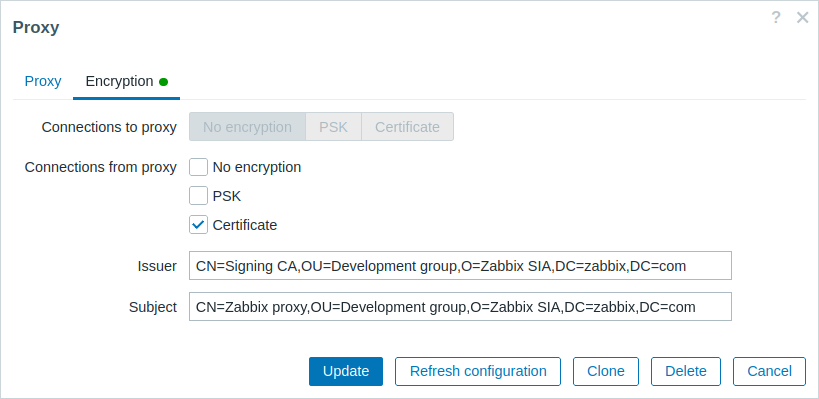
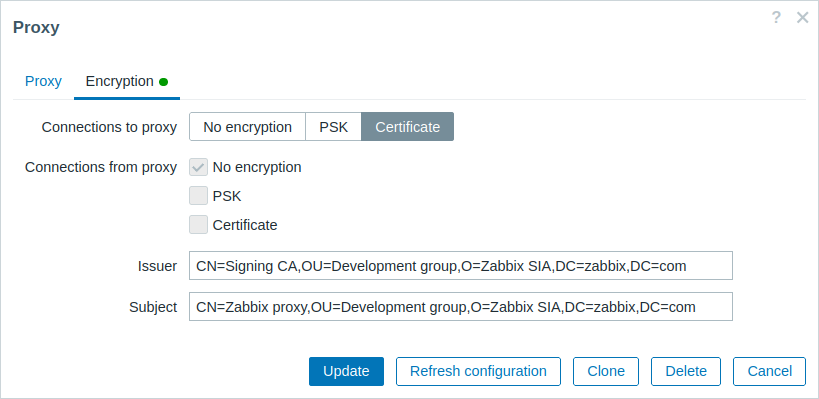
5. Configure encryption for this proxy in Zabbix frontend:
- Go to: Administration → Proxies
- Select proxy and click on Encryption tab
In examples below Issuer and Subject fields are filled in - see Restricting allowed certificate Issuer and Subject why and how to use these fields.
For active proxy
For passive proxy
Configuring certificate-based encryption for Zabbix agent
1. Prepare files with top-level CA certificates, agent certificate
(chain) and private key as described in Configuring certificate on
Zabbix
server.
Edit parameters TLSCAFile, TLSCertFile, TLSKeyFile in agent
configuration accordingly.
2. For active checks edit TLSConnect parameter:
TLSConnect=certFor passive checks edit TLSAccept parameter:
TLSAccept=cert3. Now you have a minimal certificate-based agent configuration. You
may prefer to improve agent security by setting TLSServerCertIssuer
and TLSServerCertSubject parameters. (see Restricting allowed
certificate Issuer and
Subject).
4. In final agent configuration file TLS parameters may look like:
TLSConnect=cert
TLSAccept=cert
TLSCAFile=/home/zabbix/zabbix_ca_file
TLSServerCertIssuer=CN=Signing CA,OU=Development group,O=Zabbix SIA,DC=zabbix,DC=com
TLSServerCertSubject=CN=Zabbix proxy,OU=Development group,O=Zabbix SIA,DC=zabbix,DC=com
TLSCertFile=/home/zabbix/zabbix_agentd.crt
TLSKeyFile=/home/zabbix/zabbix_agentd.key
(Example assumes that host is monitored via proxy, hence proxy certificate Subject.)
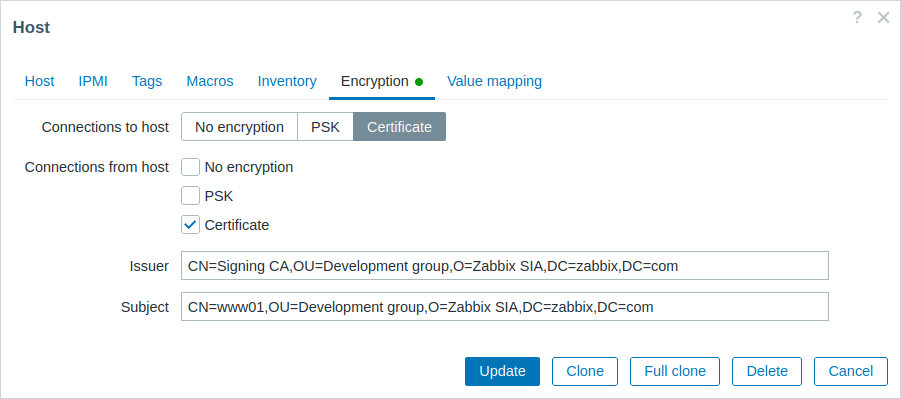
5. Configure encryption for this agent in Zabbix frontend:
- Go to: Configuration → Hosts
- Select host and click on Encryption tab
In example below Issuer and Subject fields are filled in - see Restricting allowed certificate Issuer and Subject why and how to use these fields.
Zabbix web service
1. Prepare files with the top-level CA certificates, the Zabbix web service certificate/certificate chain, and the private key as described in the Zabbix server section.
Then, edit the TLSCAFile, TLSCertFile, and TLSKeyFile parameters in the Zabbix web service configuration file accordingly.
2. Edit an additional TLS parameter in the Zabbix web service configuration file: TLSAccept=cert
TLS parameters in the final web service configuration file may look as follows:
TLSAccept=cert
TLSCAFile=/home/zabbix/zabbix_ca_file
TLSCertFile=/home/zabbix/zabbix_web_service.crt
TLSKeyFile=/home/zabbix/zabbix_web_service.key
3. Configure Zabbix server to connect to the TLS-configured Zabbix web service by editing the WebServiceURL parameter in the Zabbix server configuration file:
WebServiceURL=https://example.comRestricting allowed certificate Issuer and Subject
When two Zabbix components (e.g. server and agent) establish a TLS
connection they both check each others certificates. If a peer
certificate is signed by a trusted CA (with pre-configured top-level
certificate in TLSCAFile), is valid, has not expired and passes some
other checks then communication can proceed. Certificate issuer and
subject are not checked in this simplest case.
Here is a risk - anybody with a valid certificate can impersonate anybody else (e.g. a host certificate can be used to impersonate server). This may be acceptable in small environments where certificates are signed by a dedicated in-house CA and risk of impersonating is low.
If your top-level CA is used for issuing other certificates which should not be accepted by Zabbix or you want to reduce risk of impersonating you can restrict allowed certificates by specifying their Issuer and Subject strings.
For example, you can write in Zabbix proxy configuration file:
TLSServerCertIssuer=CN=Signing CA,OU=Development group,O=Zabbix SIA,DC=zabbix,DC=com
TLSServerCertSubject=CN=Zabbix server,OU=Development group,O=Zabbix SIA,DC=zabbix,DC=com
With these settings, an active proxy will not talk to Zabbix server with different Issuer or Subject string in certificate, a passive proxy will not accept requests from such server.
A few notes about Issuer or Subject string matching:
- Issuer and Subject strings are checked independently. Both are optional.
- UTF-8 characters are allowed.
- Unspecified string means any string is accepted.
- Strings are compared "as-is", they must be exactly the same to match.
- Wildcards and regexp's are not supported in matching.
- Only some requirements from RFC 4514 Lightweight Directory Access
Protocol (LDAP): String Representation of Distinguished
Names are implemented:
- escape characters '"' (U+0022), '+' U+002B, ',' U+002C, ';' U+003B, '<' U+003C, '>' U+003E, '\' U+005C anywhere in string.
- escape characters space (' ' U+0020) or number sign ('#' U+0023) at the beginning of string.
- escape character space (' ' U+0020) at the end of string.
- Match fails if a null character (U+0000) is encountered (RFC 4514 allows it).
- Requirements of RFC 4517 Lightweight Directory Access Protocol (LDAP): Syntaxes and Matching Rules and RFC 4518 Lightweight Directory Access Protocol (LDAP): Internationalized String Preparation are not supported due to amount of work required.
Order of fields in Issuer and Subject strings and formatting are important! Zabbix follows RFC 4514 recommendation and uses "reverse" order of fields.
The reverse order can be illustrated by example:
TLSServerCertIssuer=CN=Signing CA,OU=Development group,O=Zabbix SIA,DC=zabbix,DC=com
TLSServerCertSubject=CN=Zabbix proxy,OU=Development group,O=Zabbix SIA,DC=zabbix,DC=com
Note that it starts with low level (CN), proceeds to mid-level (OU, O) and ends with top-level (DC) fields.
OpenSSL by default shows certificate Issuer and Subject fields in "normal" order, depending on additional options used:
$ openssl x509 -noout -in /home/zabbix/zabbix_proxy.crt -issuer -subject
issuer= /DC=com/DC=zabbix/O=Zabbix SIA/OU=Development group/CN=Signing CA
subject= /DC=com/DC=zabbix/O=Zabbix SIA/OU=Development group/CN=Zabbix proxy

$ openssl x509 -noout -text -in /home/zabbix/zabbix_proxy.crt
Certificate:
        ...
        Issuer: DC=com, DC=zabbix, O=Zabbix SIA, OU=Development group, CN=Signing CA
    ...
        Subject: DC=com, DC=zabbix, O=Zabbix SIA, OU=Development group, CN=Zabbix proxy
Here Issuer and Subject strings start with top-level (DC) and end with low-level (CN) field, spaces and field separators depend on options used. None of these values will match in Zabbix Issuer and Subject fields!
To get proper Issuer and Subject strings usable
in Zabbix invoke OpenSSL with special options
-nameopt esc_2253,esc_ctrl,utf8,dump_nostr,dump_unknown,dump_der,sep_comma_plus,dn_rev,sname:
$ openssl x509 -noout -issuer -subject \
        -nameopt esc_2253,esc_ctrl,utf8,dump_nostr,dump_unknown,dump_der,sep_comma_plus,dn_rev,sname \
        -in /home/zabbix/zabbix_proxy.crt
issuer= CN=Signing CA,OU=Development group,O=Zabbix SIA,DC=zabbix,DC=com
subject= CN=Zabbix proxy,OU=Development group,O=Zabbix SIA,DC=zabbix,DC=com
Now string fields are in reverse order, fields are comma-separated, can be used in Zabbix configuration files and frontend.
Rules for matching Issuer and Subject strings
The rules for matching Issuer and Subject strings are as follows:
IssuerandSubjectstrings are checked independently. Both are optional.- An unspecified string means that any string is accepted.
- Strings are compared as is and must match exactly.
- UTF-8 characters are supported. However, wildcards (
*) or regular expressions are not supported. - The following RFC 4514 requirements are implemented - characters that require escaping (with a '
\' backslash, U+005C):- anywhere in the string: '
"' (U+0022), '+' (U+002B), ',' (U+002C), ';' (U+003B), '<' (U+003C), '>' (U+003E), '\\' (U+005C); - at the beginning of the string: space (' ', U+0020) or number sign ('
#', U+0023); - at the end of the string: space (' ', U+0020).
- anywhere in the string: '
- Null characters (U+0000) are not supported. If a null character is encountered, the matching will fail.
- RFC 4517 and RFC 4518 standards are not supported.
For example, if Issuer and Subject organization (O) strings contain trailing spaces and the Subject organizational unit (OU) string contains double quotes, these characters must be escaped:
TLSServerCertIssuer=CN=Signing CA,OU=Development head,O=\ Example SIA\ ,DC=example,DC=com
TLSServerCertSubject=CN=Zabbix server,OU=Development group \"5\",O=\ Example SIA\ ,DC=example,DC=com
Field order and formatting
Zabbix follows the recommendations of RFC 4514, which specifies a "reverse" order for these fields, starting with the lowest-level fields (CN), proceeding to the mid-level fields (OU, O), and concluding with the highest-level fields (DC).
TLSServerCertIssuer=CN=Signing CA,OU=Development group,O=Zabbix SIA,DC=zabbix,DC=com
TLSServerCertSubject=CN=Zabbix proxy,OU=Development group,O=Zabbix SIA,DC=zabbix,DC=com
In contrast, OpenSSL by default displays the Issuer and Subject strings in top-level to low-level order.
In the following example, Issuer and Subject fields start with the top-level (DC) and end with the low-level (CN) field.
The formatting with spaces and field separators also varies based on the options used, and thus will not match the format required by Zabbix.
$ openssl x509 -noout -in /home/zabbix/zabbix_proxy.crt -issuer -subject
issuer= /DC=com/DC=zabbix/O=Zabbix SIA/OU=Development group/CN=Signing CA
subject= /DC=com/DC=zabbix/O=Zabbix SIA/OU=Development group/CN=Zabbix proxy

$ openssl x509 -noout -text -in /home/zabbix/zabbix_proxy.crt
Certificate:
    ...
        Issuer: DC=com, DC=zabbix, O=Zabbix SIA, OU=Development group, CN=Signing CA
        ...
        Subject: DC=com, DC=zabbix, O=Zabbix SIA, OU=Development group, CN=Zabbix proxy
To format Issuer and Subject strings correctly for Zabbix, invoke OpenSSL with the following options:
$ openssl x509 -noout -issuer -subject \
    -nameopt esc_2253,esc_ctrl,utf8,dump_nostr,dump_unknown,dump_der,sep_comma_plus,dn_rev,sname\
    -in /home/zabbix/zabbix_proxy.crt
The output will then be in reverse order, comma-separated, and usable in Zabbix configuration files and frontend:
issuer= CN=Signing CA,OU=Development group,O=Zabbix SIA,DC=zabbix,DC=com
subject= CN=Zabbix proxy,OU=Development group,O=Zabbix SIA,DC=zabbix,DC=com
Limitations on using X.509 v3 certificate extensions
- Subject Alternative Name (subjectAltName) extension.
Alternative subject names from subjectAltName extension (like IP address, e-mail address) are not supported by Zabbix. Only value of "Subject" field can be checked in Zabbix (see Restricting allowed certificate Issuer and Subject).
If certificate uses the subjectAltName extension then result depends on particular combination of crypto toolkits Zabbix components are compiled with (it may or may not work, Zabbix may refuse to accept such certificates from peers). - Extended Key Usage extension.
If used then generally both clientAuth (TLS WWW client authentication) and serverAuth (TLS WWW server authentication) are necessary.
For example, in passive checks Zabbix agent acts in a TLS server role, so serverAuth must be set in agent certificate. For active checks agent certificate needs clientAuth to be set.
GnuTLS issues a warning in case of key usage violation but allows communication to proceed. - Name Constraints extension.
Not all crypto toolkits support it. This extension may prevent Zabbix from loading CA certificates where this section is marked as critical (depends on particular crypto toolkit).
Certificate Revocation Lists (CRL)
If a certificate is compromised CA can revoke it by including in CRL.
CRLs can be configured in server, proxy and agent configuration file
using parameter TLSCRLFile. For example:
TLSCRLFile=/home/zabbix/zabbix_crl_filewhere zabbix_crl_file may contain CRLs from several CAs and look like:
-----BEGIN X509 CRL-----
MIIB/DCB5QIBATANBgkqhkiG9w0BAQUFADCBgTETMBEGCgmSJomT8ixkARkWA2Nv
...
treZeUPjb7LSmZ3K2hpbZN7SoOZcAoHQ3GWd9npuctg=
-----END X509 CRL-----
-----BEGIN X509 CRL-----
MIIB+TCB4gIBATANBgkqhkiG9w0BAQUFADB/MRMwEQYKCZImiZPyLGQBGRYDY29t
...
CAEebS2CND3ShBedZ8YSil59O6JvaDP61lR5lNs=
-----END X509 CRL-----
CRL file is loaded only on Zabbix start. CRL update requires restart.
If Zabbix component is compiled with OpenSSL
and CRLs are used then each top and intermediate level CA in certificate
chains must have a corresponding CRL (it can be empty) in TLSCRLFile.