
本页内容
15 为 VMware 创建自定义性能计数器名称
概述
VMware 性能计数器路径采用
group/counter[rollup] 格式,其中:
group- 性能计数器组,例如 cpucounter- 性能计数器名称,例如 usagemhzrollup- 性能计数器汇总类型,例如 average
因此,上述示例对应的计数器路径为:
cpu/usagemhz[average]
性能计数器组说明、计数器名称和汇总类型可在 VMware 文档 中找到。
也可以通过在 Zabbix 中使用脚本监控项来获取内部名称,并创建自定义性能计数器名称。
配置
- 在主VMware 主机 上创建禁用的脚本 监控项(其中包含 eventlog[] 监控项),参数如下:
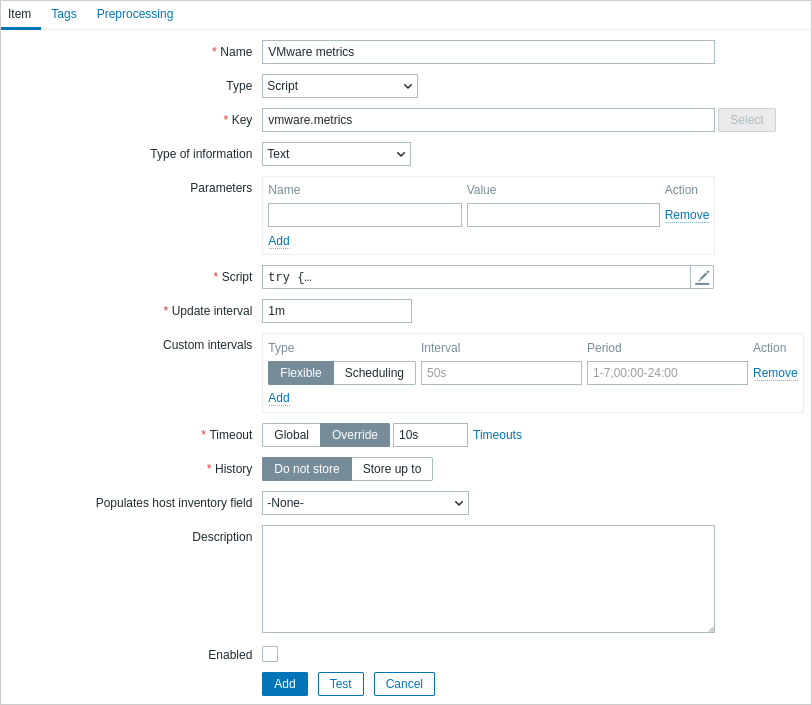
- 名称:VMware metrics
- 类型:脚本
- 键值:vmware.metrics
- 信息类型:文本
- 脚本:copy 并粘贴下面提供的脚本
- 超时:10
- 历史数据:不存储
- 启用:未勾选
脚本
try {
    Zabbix.log(4, 'vmware metrics script');

    var result, resp,
    req = new HttpRequest();
    req.addHeader('Content-Type: application/xml');
    req.addHeader('SOAPAction: "urn:vim25/6. 0"');

    login = '<soapenv:Envelope xmlns:soapenv="http://schemas.xmlsoap.org/soap/envelope/" xmlns:urn="urn:vim25">\
    <soapenv:Header/>\
    <soapenv:Body>\
        <urn:Login>\
            <urn:_this type="SessionManager">SessionManager</urn:_this>\
            <urn:userName>{$VMWARE.USERNAME}</urn:userName>\
            <urn:password>{$VMWARE.PASSWORD}</urn:password>\
        </urn:Login>\
    </soapenv:Body>\
</soapenv:Envelope>'
    resp = req.post("{$VMWARE.URL}", login);
    if (req.getStatus() != 200) {
        throw '响应代码: '+req.getStatus();
    }

    query = '<soapenv:Envelope xmlns:soapenv="http://schemas.xmlsoap.org/soap/envelope/" xmlns:urn="urn:vim25">\
<soapenv:Header/>\
    <soapenv:Body>\
        <urn:RetrieveProperties>\
            <urn:_this type="PropertyCollector">propertyCollector</urn:_this>\
            <urn:specSet>\
                <urn:propSet>\
                   <urn:type>PerformanceManager</urn:type>\
                   <urn:pathSet>perfCounter</urn:pathSet>\
                </urn:propSet>\
                <urn:objectSet>\
                   <urn:obj type="PerformanceManager">PerfMgr</urn:obj>\
                </urn:objectSet>\
            </urn:specSet>\
        </urn:RetrieveProperties>\
    </soapenv:Body>\
</soapenv:Envelope>'
    resp = req.post("{$VMWARE.URL}", query);
    if (req.getStatus() != 200) {
        throw '响应代码: '+req.getStatus();
    }
    Zabbix.log(4, 'vmware metrics=' + resp);
    result = resp;

    logout = '<soapenv:Envelope xmlns:soapenv="http://schemas.xmlsoap.org/soap/envelope/" xmlns:urn="urn:vim25">\
    <soapenv:Header/>\
    <soapenv:Body>\
        <urn:Logout>\
            <urn:_this type="SessionManager">SessionManager</urn:_this>\
        </urn:Logout>\
    </soapenv:Body>\
</soapenv:Envelope>'

    resp = req.post("{$VMWARE.URL}",logout);
    if (req.getStatus() != 200) {
        throw '响应代码: '+req.getStatus();
    }

} catch (error) {
    Zabbix.log(4, 'vmware 调用失败 : '+error);
    result = {};
}

return result;
一旦配置好 监控项,点击 Test 按钮,然后点击 Get value。
{width=600}
将接收到的XML复制到任意XML格式化工具中,并查找所需的指标。
一个指标的XML示例:
<PerfCounterInfo xsi:type="PerfCounterInfo">
    <key>6</key>
    <nameInfo>
        <label>Usage in MHz</label>
        <summary>CPU usage in megahertz during the interval</summary>
        <key>usagemhz</key>
    </nameInfo>
    <groupInfo>
        <label>CPU</label>
        <summary>CPU</summary>
        <key>cpu</key>
    </groupInfo>
    <unitInfo>
        <label>MHz</label>
        <summary>Megahertz</summary>
        <key>megaHertz</key>
    </unitInfo>
    <rollupType>average</rollupType>
    <statsType>rate</statsType>
    <level>1</level>
    <perDeviceLevel>3</perDeviceLevel>
</PerfCounterInfo>
使用XPath从接收到的XML中提取计数器路径。以上示例的XPath如下:
| 字段 | xPath | 值 |
|---|---|---|
| group | //groupInfo[../key=6]/key | cpu |
| counter | //nameInfo[../key=6]/key | usagemhz |
| rollup | //rollupType[../key=6] | average |
本例中的性能计数器路径为:cpu/usagemhz[average]