
CSV uz JSON priekšapstrāde
Pārskats
Šajā priekšapstrādes darbībā CSV faila datus var pārveidot JSON formātā. Tā tiek atbalstīta:
- vienumos (vienumu prototipos)
- zema līmeņa atklāšanas noteikumos
Konfigurēšana
Lai konfigurētu CSV uz JSON priekšapstrādes darbību:
- Atveriet cilni Priekšapstrāde vienuma/atklāšanas kārtulas konfigurācijā.
- Noklikšķiniet uz Pievienot.
- Atlasiet opciju CSV uz JSON.
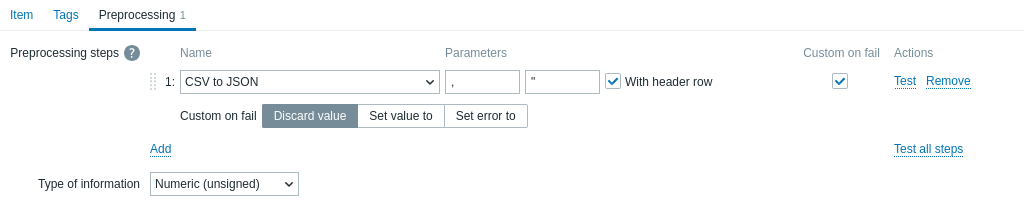
Pirmais parametrs ļauj iestatīt pielāgotu atdalītāju. Ņemiet vērā: ja CSV ievades pirmā rinda sākas ar "Sep=" un tai seko viena UTF-8 rakstzīme, šī rakstzīme tiks izmantota kā atdalītājs, ja pirmais parametrs nav iestatīts. Ja pirmais parametrs nav iestatīts un atdalītājs netiek iegūts no rindas "Sep=", kā atdalītājs tiek izmantots komats.
Otrais neobligātais parametrs ļauj iestatīt pēdiņu simbolu.
Ja ir atzīmēta izvēles rūtiņa Ar galvenes rindu, galvenes rindas vērtības tiks interpretētas kā kolonnu nosaukumi (plašāku informāciju skatiet sadaļā Galvenes apstrāde).
Ja ir atzīmēta izvēles rūtiņa Pielāgota darbība kļūmes gadījumā, vienums nekļūs par neatbalstītu, ja priekšapstrādes darbība neizdosies. Turklāt var iestatīt pielāgotas kļūdu apstrādes opcijas: atmest vērtību, iestatīt norādītu vērtību vai iestatīt norādītu kļūdas ziņojumu.
Header processing
The CSV file header line can be processed in two different ways:
- If the With header row checkbox is marked - header line values are interpreted as column names. In this case the column names must be unique and the data row should not contain more columns than the header row;
- If the With header row checkbox is not marked - the header line is interpreted as data. Column names are generated automatically (1,2,3,4...)
CSV file example:
Nr,Item name,Key,Qty
1,active agent item,agent.hostname,33
"2","passive agent item","agent.version","44"
3,"active,passive agent items",agent.ping,55
A quotation character within a quoted field in the input must be escaped by preceding it with another quotation character.
Processing header line
JSON output when a header line is expected:
[
   {
      "Nr":"1",
      "Item name":"active agent item",
      "Key":"agent.hostname",
      "Qty":"33"
   },
   {
      "Nr":"2",
      "Item name":"passive agent item",
      "Key":"agent.version",
      "Qty":"44"
   },
   {
      "Nr":"3",
      "Item name":"active,passive agent items",
      "Key":"agent.ping",
      "Qty":"55"
   }
]
No header line processing
JSON output when a header line is not expected:
[
   {
      "1":"Nr",
      "2":"Item name",
      "3":"Key"
      "4":"Qty"
   },
   {
      "1":"1",
      "2":"active agent item",
      "3":"agent.hostname"
      "4":"33"
   },
   {
      "1":"2",
      "2":"passive agent item",
      "3":"agent.version"
      "4":"44"
   },
   {
      "1":"3",
      "2":"active,passive agent items",
      "3":"agent.ping"
      "4":"55"
   }
]