
In questa pagina
6 Aggiornamento di massa
Panoramica
Con l'aggiornamento di massa puoi modificare alcuni attributi di un numero di trigger tutti insieme, evitando di dover aprire ogni singolo trigger per la modifica.
Utilizzo dell'aggiornamento di massa
Per aggiornare più trigger contemporaneamente, procedere come segue:
- Selezionare le caselle di controllo dei trigger che si desidera aggiornare nell'elenco
- Fare clic su Aggiornamento di massa sotto l'elenco
- Accedere alla scheda con gli attributi richiesti (Trigger, Tag o Dipendenze)
- Selezionare le caselle di controllo degli attributi da aggiornare
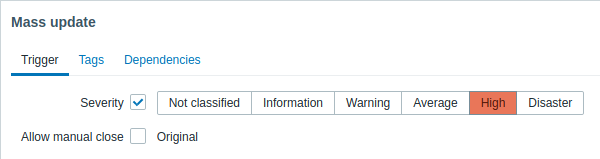
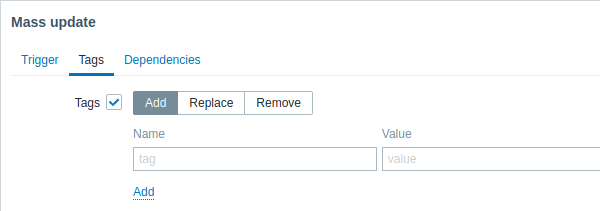
Quando si seleziona il pulsante corrispondente per l'aggiornamento dei tag, sono disponibili le seguenti opzioni:
- Aggiungi - consente di aggiungere nuovi tag ai trigger;
- Sostituisci - rimuove tutti i tag esistenti dal trigger e li sostituisce con quello o quelli specificati di seguito;
- Rimuovi - rimuove dai trigger i tag specificati.
I tag con lo stesso nome ma valori diversi non sono considerati "duplicati" e possono essere aggiunti allo stesso trigger.
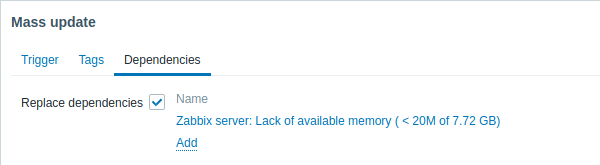
Sostituisci dipendenze - rimuove tutte le dipendenze esistenti dal trigger e le sostituisce con quella o quelle specificate.
Fare clic su Aggiorna per applicare le modifiche.