
- Connessione sicura tra frontend e server
- Panoramica
- Configurazione
- Risoluzione dei problemi
- L'indirizzo IP del frontend non è consentito
- La connessione non crittografata non è consentita
- Il frontend tenta TLS mentre il server si aspetta una connessione non crittografata
- Il certificato del frontend non è considerato attendibile
- Il file della chiave TLS non è leggibile
- I file TLS non sono validi o danneggiati
Connessione sicura tra frontend e server
Panoramica
Questa sezione fornisce i passaggi di configurazione di Zabbix e alcuni esempi di configurazione per connessioni TLS sicure tra il frontend di Zabbix e il server Zabbix.
Configurazione
Per impostazione predefinita, la comunicazione tra il frontend Zabbix e il server Zabbix non è crittografata.
Per una maggiore sicurezza, abilita TLS su entrambi i lati.
Di seguito è riportato un esempio del modo più semplice per farlo.
1. Genera certificati e chiavi.
Crea una directory di lavoro:
sudo mkdir -p /etc/zabbix/ssl && cd /etc/zabbix/sslCrea un certificato CA (modifica il valore MyZabbixCA in modo che corrisponda al nome comune effettivo):
sudo openssl genrsa -out ca.key 4096
sudo openssl req -new -x509 -days 3650 -key ca.key -out ca.crt -subj "/CN=MyZabbixCA/"
Genera una chiave privata e un certificato per il server Zabbix (modifica il valore zabbix-server.example.com in modo che corrisponda al nome comune effettivo):
sudo openssl genrsa -out server.key 2048
sudo openssl req -new -key server.key -out server.csr -subj "/CN=zabbix-server.example.com/"
sudo openssl x509 -req -days 365 -in server.csr -CA ca.crt -CAkey ca.key -CAcreateserial -sha256 -out server.crt
Genera una chiave privata e un certificato per il frontend Zabbix (modifica il valore zabbix-frontend-node in modo che corrisponda al nome comune effettivo):
sudo openssl genrsa -out frontend.key 2048
sudo openssl req -new -key frontend.key -out frontend.csr -subj "/CN=zabbix-frontend-node/"
sudo openssl x509 -req -days 365 -in frontend.csr -CA ca.crt -CAkey ca.key -CAcreateserial -sha256 -out frontend.crt
2. Imposta le autorizzazioni appropriate.
Per il server Zabbix (modifica il proprietario/gruppo in base all'utente del demone del server Zabbix della tua distribuzione):
sudo chown root:zabbix /etc/zabbix/ssl/server.{crt,key} /etc/zabbix/ssl/ca.crt
sudo chmod 640 /etc/zabbix/ssl/server.key
sudo chmod 644 /etc/zabbix/ssl/server.crt /etc/zabbix/ssl/ca.crt
Per il frontend (modifica il proprietario/gruppo in base all'utente del webserver della tua distribuzione):
sudo chown root:www-data /etc/zabbix/ssl/frontend.{crt,key}
sudo chmod 640 /etc/zabbix/ssl/frontend.key
sudo chmod 644 /etc/zabbix/ssl/frontend.crt
3. Configura il server Zabbix.
Nel file di configurazione del server (zabbix_server.conf) aggiungi:
TLSFrontendAccept=cert
TLSCertFile=/etc/zabbix/ssl/server.crt
TLSKeyFile=/etc/zabbix/ssl/server.key
TLSCAFile=/etc/zabbix/ssl/ca.crt
# Facoltativo:
# TLSFrontendCertIssuer=CN=MyZabbixCA
# TLSFrontendCertSubject=CN=zabbix-frontend-node
Quindi riavvia il server:
sudo systemctl restart zabbix-server4. Configura il frontend Zabbix.
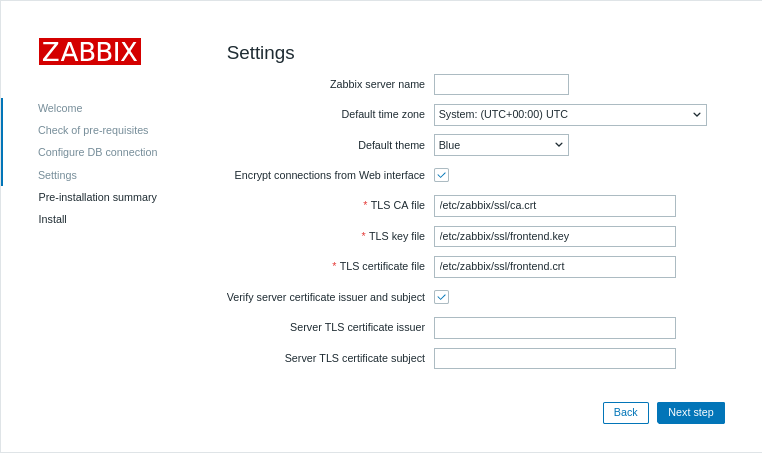
Durante l'installazione dell'interfaccia web, abilita l'opzione Crittografa le connessioni dall'interfaccia web (e l'opzione Verifica l'emittente e il soggetto del certificato del server, se necessario) e compila i campi File CA TLS, File della chiave TLS, File del certificato TLS (e i campi Emittente del certificato TLS del server e Soggetto del certificato TLS del server, se necessario):
| Parametro | Descrizione |
|---|---|
| File CA TLS | Specifica il percorso completo del file del certificato dell'Autorità di certificazione (CA) utilizzato per verificare il certificato del server. |
| File della chiave TLS | Specifica il percorso completo del file della chiave privata client corrispondente al certificato client. |
| File del certificato TLS | Specifica il percorso completo del file del certificato client se è richiesta l'autenticazione TLS reciproca. |
| Emittente del certificato TLS del server | Specifica un Distinguished Name (DN) dell'emittente da confrontare con il certificato del server. |
| Soggetto del certificato TLS del server | Specifica un Distinguished Name (DN) del soggetto da confrontare con il certificato del server. |
Nelle installazioni esistenti, modifica i seguenti parametri nel file di configurazione del frontend:
$ZBX_SERVER_TLS['ACTIVE'] = 'true';
$ZBX_SERVER_TLS['CA_FILE'] = '/etc/zabbix/ssl/ca.crt';
$ZBX_SERVER_TLS['KEY_FILE'] = '/etc/zabbix/ssl/frontend.key';
$ZBX_SERVER_TLS['CERT_FILE'] = '/etc/zabbix/ssl/frontend.crt';
// Facoltativo:
// $ZBX_SERVER_TLS['CERTIFICATE_ISSUER']  = 'CN=MyZabbixCA';
// $ZBX_SERVER_TLS['CERTIFICATE_SUBJECT'] = 'CN=zabbix-server.example.com';
5. Verifica la crittografia confermando che non siano presenti messaggi di errore nel frontend Zabbix o nel file di log del server Zabbix:
tail -f /var/log/zabbix/zabbix_server.logRisoluzione dei problemi
Una configurazione TLS errata o incompleta può causare errori nel frontend di Zabbix oppure indicare che il server Zabbix è in esecuzione, ma che la connessione non viene stabilita correttamente:
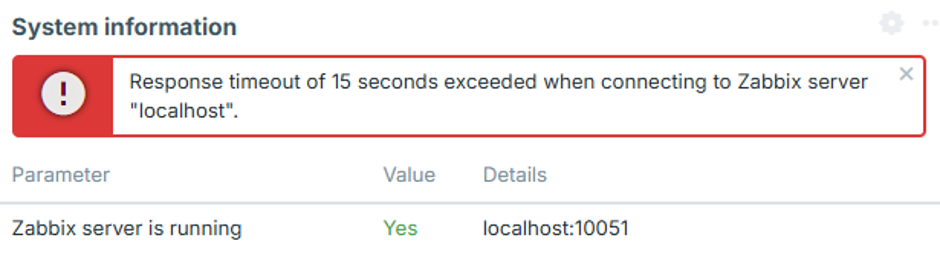
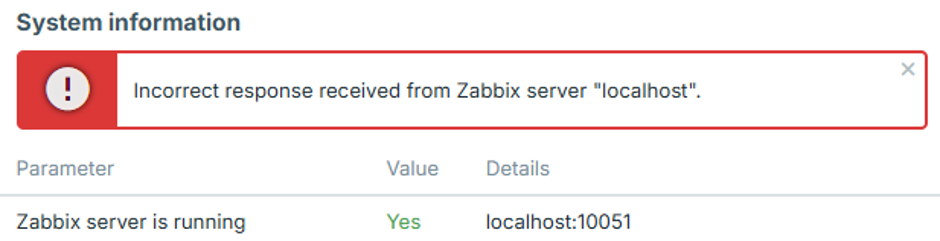
Per identificare il problema di configurazione esatto, impostare il livello di log del server Zabbix su 4, riprodurre l'errore nel frontend e controllare il log del server Zabbix per individuare il messaggio di errore corrispondente.
I casi seguenti descrivono gli errori comuni e le relative possibili cause.
L'indirizzo IP del frontend non è consentito
Il log del server Zabbix contiene un errore simile a:
54283:20260819:105926.400 frontend connection from "127.0.0.1" is not allowed by FrontendAllowedIPLa connessione viene interrotta dopo l'handshake TCP perché l'indirizzo IP del frontend non è autorizzato.
Aggiungere l'indirizzo IP del frontend al parametro FrontendAllowedIP in zabbix_server.conf e riavviare il server Zabbix.
La connessione non crittografata non è consentita
Il log del server Zabbix contiene un errore simile a:
56884:20260819:111154.285 frontend connection of type "unencrypted" is not allowed by TLSFrontendAcceptIl server Zabbix è configurato per accettare solo connessioni TLS, ad esempio con TLSFrontendAccept=cert, ma il frontend sta tentando di connettersi senza crittografia.
Abilitare la crittografia del frontend e configurare i file TLS richiesti in zabbix.conf.php, come descritto nel passaggio 4 della Configurazione.
Il frontend tenta TLS mentre il server si aspetta una connessione non crittografata
Il log del server Zabbix contiene un errore simile a:
61091:20260819:115916.019 End of zbx_tls_accept():FAIL error:'TLS handshake set result code to 1: file ../ssl/record/rec_layer_s3.c line 317 func ssl3_read_n: error:0A000126:SSL routines::unexpected eof while reading: TLS write fatal alert "decode error"'Il messaggio di errore esatto dipende dalla versione di OpenSSL.
Il server Zabbix è configurato per accettare solo connessioni non crittografate, ad esempio con TLSFrontendAccept=unencrypted, mentre il frontend tenta di stabilire una connessione TLS.
Configurare il server Zabbix affinché accetti connessioni TLS impostando TLSFrontendAccept=cert e definendo TLSCertFile e TLSKeyFile in zabbix_server.conf.
In alternativa, disabilitare la crittografia del frontend in zabbix.conf.php.
Il certificato del frontend non è considerato attendibile
Il log del server Zabbix contiene un errore simile a:
62248:20260819:124203.812 End of zbx_tls_accept():FAIL error:'self-signed certificate: TLS handshake set result code to 1: file ../ssl/statem/statem_srvr.c line 3522 func tls_process_client_certificate: error:0A000086:SSL routines::certificate verify failed: TLS write fatal alert "unknown CA"'Il frontend ha presentato un certificato, ma il server Zabbix non considera attendibile l'Autorità di certificazione (CA) che lo ha firmato.
Lo stesso problema può comparire anche nelle informazioni di sistema del frontend come:
fread(): SSL operation failed with code 1. OpenSSL Error messages:

error:0A000418:SSL routines::tlsv1 alert unknown ca [zabbix.php:17 → require_once() → ZBase->run() → ZBase->processRequest() → CController->run() → Widgets\SystemInfo\Actions\WidgetView->doAction() → CSystemInfoHelper::getData() → CSystemInfoHelper::getServerStatus() → CZabbixServer->getStatus() → CZabbixServer->request() → fread() → CConfigFile->{closure:/user/share/conf/zabbix.conf.php:89}() in conf/zabbix.conf.php:95]
Il frontend potrebbe inoltre visualizzare il messaggio "Incorrect response received from Zabbix server "localhost"".
Verificare che il certificato del frontend sia firmato dalla CA specificata da TLSCAFile in zabbix_server.conf.
Il file della chiave TLS non è leggibile
Il frontend potrebbe visualizzare "File della chiave TLS: il file non è leggibile."
Potrebbe inoltre visualizzare "Impossibile connettersi al server Zabbix a causa delle impostazioni TLS. Alcune funzioni non sono disponibili.".
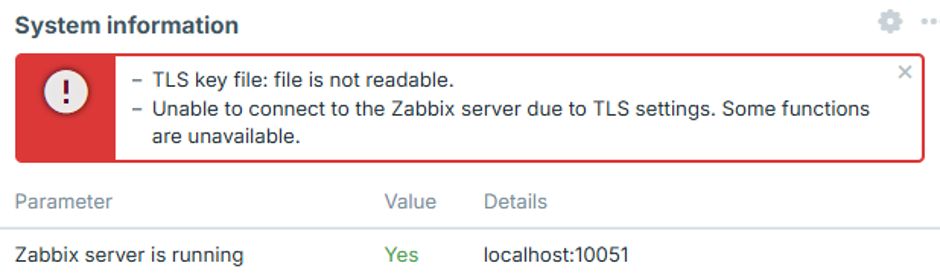
L'utente del web server non dispone di autorizzazioni sufficienti per leggere uno o più file di certificato, chiave o CA configurati in zabbix.conf.php.
Questo può verificarsi quando i file dei certificati sono archiviati in una directory con accesso limitato, come /root/ o la home directory di un utente.
Spostare i file dei certificati in una directory accessibile al web server e impostare le autorizzazioni appropriate come descritto nel passaggio 2 della Configurazione.
I file TLS non sono validi o danneggiati
Il frontend potrebbe visualizzare "Impossibile connettersi al server Zabbix a causa delle impostazioni TLS. Alcune funzioni non sono disponibili.".
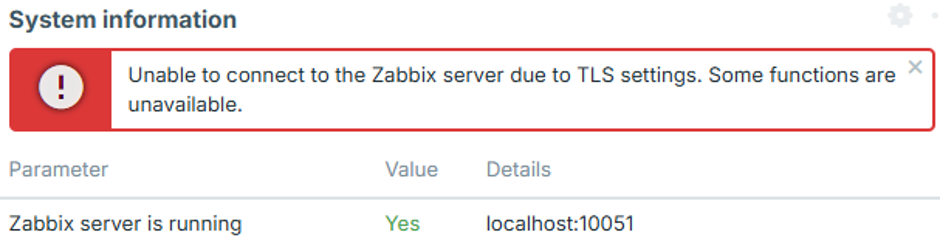
Questo può verificarsi quando i file del certificato o della chiave configurati esistono e sono leggibili, ma il loro contenuto è vuoto, danneggiato o comunque non valido. In questo caso, il frontend non stabilisce una connessione al server Zabbix e nel log del server Zabbix non viene visualizzato alcun tentativo di connessione corrispondente.
Verificare che i file del certificato e della chiave contengano dati validi e formattati correttamente e che la chiave privata corrisponda al certificato.