
Webインターフェースとサーバー間の安全な接続
概要
このセクションでは、ZabbixのWebインターフェースとZabbixサーバー間の安全なTLS接続を確立するためのセットアップ手順と設定例を説明します。
設定
デフォルトでは、Zabbix WebインターフェースとZabbixサーバー間の通信は暗号化されません。 セキュリティを強化するには、両方でTLSを有効にします。 以下に、これを行う最も簡単な方法の例を示します。
1. 証明書とキーを生成します。
作業ディレクトリを作成します。
sudo mkdir -p /etc/zabbix/ssl && cd /etc/zabbix/sslCA証明書を作成します(MyZabbixCA の値は実際のコモンネームに合わせて変更してください)。
sudo openssl genrsa -out ca.key 4096
sudo openssl req -new -x509 -days 3650 -key ca.key -out ca.crt -subj "/CN=MyZabbixCA/"Zabbixサーバー用の秘密鍵と証明書を生成します(zabbix-server.example.com の値は実際のコモンネームに合わせて変更してください)。
sudo openssl genrsa -out server.key 2048
sudo openssl req -new -key server.key -out server.csr -subj "/CN=zabbix-server.example.com/"
sudo openssl x509 -req -days 365 -in server.csr -CA ca.crt -CAkey ca.key -CAcreateserial -sha256 -out server.crt
Zabbix Webインターフェース用の秘密鍵と証明書を生成します(zabbix-frontend-node の値は実際のコモンネームに合わせて変更してください)。
sudo openssl genrsa -out frontend.key 2048
sudo openssl req -new -key frontend.key -out frontend.csr -subj "/CN=zabbix-frontend-node/"
sudo openssl x509 -req -days 365 -in frontend.csr -CA ca.crt -CAkey ca.key -CAcreateserial -sha256 -out frontend.crt
2. 適切な権限を設定します。
Zabbixサーバーの場合(所有者とグループは、ディストリビューションのZabbixサーバーデーモンユーザーに合わせて変更してください)。
sudo chown root:zabbix /etc/zabbix/ssl/server.{crt,key} /etc/zabbix/ssl/ca.crt
sudo chmod 640 /etc/zabbix/ssl/server.key
sudo chmod 644 /etc/zabbix/ssl/server.crt /etc/zabbix/ssl/ca.crt
Webインターフェースの場合(所有者とグループは、ディストリビューションのWebサーバーユーザーに合わせて変更してください)。
sudo chown root:www-data /etc/zabbix/ssl/frontend.{crt,key}
sudo chmod 640 /etc/zabbix/ssl/frontend.key
sudo chmod 644 /etc/zabbix/ssl/frontend.crt
3. Zabbixサーバーを設定します。
サーバー設定ファイル(zabbix_server.conf)に次の設定を追加します。
TLSFrontendAccept=cert
TLSCertFile=/etc/zabbix/ssl/server.crt
TLSKeyFile=/etc/zabbix/ssl/server.key
TLSCAFile=/etc/zabbix/ssl/ca.crt
# オプション:
# TLSFrontendCertIssuer=CN=MyZabbixCA
# TLSFrontendCertSubject=CN=zabbix-frontend-node
次に、サーバーを再起動します。
sudo systemctl restart zabbix-server4. Zabbix Webインターフェースを設定します。
Webインターフェースのインストール中に、Webインターフェースからの接続を暗号化 オプションを有効にします(必要に応じて、サーバー証明書の発行者とサブジェクトを検証 オプションも有効にします)。次に、TLS CAファイル、TLSキーファイル、TLS証明書ファイル の各フィールド(必要に応じて、サーバーTLS証明書の発行者 および サーバーTLS証明書のサブジェクト フィールドも)に値を入力します。
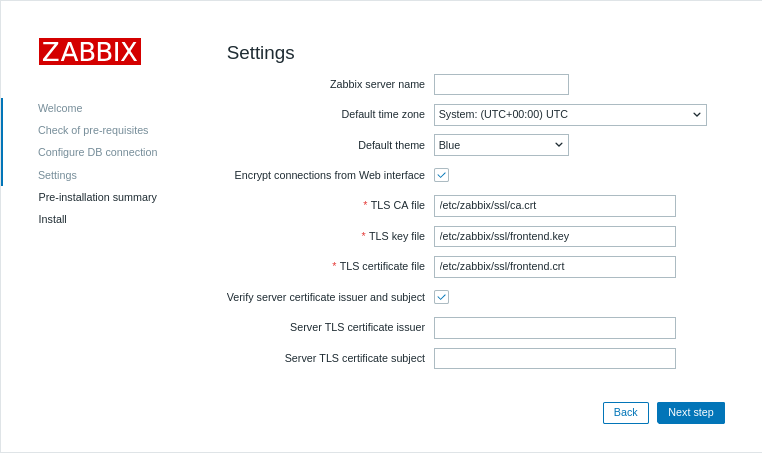
| パラメーター | 説明 |
|---|---|
| TLS CAファイル | サーバーの証明書の検証に使用する認証局(CA)証明書ファイルの完全なパスを指定します。 |
| TLSキーファイル | クライアント証明書に対応するクライアント秘密鍵ファイルの完全なパスを指定します。 |
| TLS証明書ファイル | 相互TLS認証が必要な場合は、クライアント証明書ファイルの完全なパスを指定します。 |
| サーバーTLS証明書の発行者 | サーバーの証明書と照合する発行者の識別名(DN)を指定します。 |
| サーバーTLS証明書のサブジェクト | サーバーの証明書と照合するサブジェクトの識別名(DN)を指定します。 |
既存のインストールでは、Webインターフェース設定ファイルの次のパラメーターを編集します。
$ZBX_SERVER_TLS['ACTIVE'] = 'true';
$ZBX_SERVER_TLS['CA_FILE'] = '/etc/zabbix/ssl/ca.crt';
$ZBX_SERVER_TLS['KEY_FILE'] = '/etc/zabbix/ssl/frontend.key';
$ZBX_SERVER_TLS['CERT_FILE'] = '/etc/zabbix/ssl/frontend.crt';
// オプション:
// $ZBX_SERVER_TLS['CERTIFICATE_ISSUER']  = 'CN=MyZabbixCA';
// $ZBX_SERVER_TLS['CERTIFICATE_SUBJECT'] = 'CN=zabbix-server.example.com';
5. Zabbix WebインターフェースまたはZabbixサーバーのログファイルにエラーメッセージがないことを確認して、暗号化を検証します。
tail -f /var/log/zabbix/zabbix_server.logトラブルシューティング
TLS設定が正しくない、または不完全な場合、ZabbixのWebインターフェースでエラーが発生したり、Zabbixサーバーが実行中であるにもかかわらず接続が正常に確立されていないことを示す場合があります。
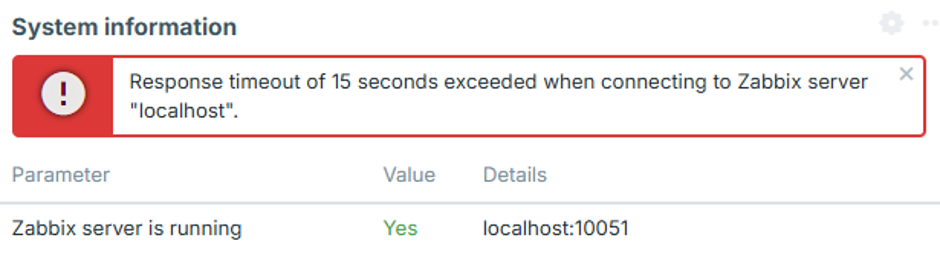
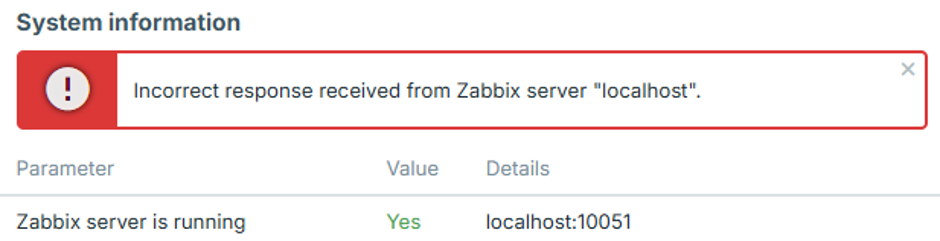
正確な設定上の問題を特定するには、Zabbixサーバーのログレベルを4に設定し、Webインターフェースでエラーを再現してから、対応するエラーメッセージがないかZabbixサーバーのログを確認します。
以下では、一般的なエラーと考えられる原因について説明します。
WebインターフェースのIPアドレスが許可されていない
Zabbixサーバーのログに、次のようなエラーが記録されます。
54283:20260819:105926.400 frontend connection from "127.0.0.1" is not allowed by FrontendAllowedIPWebインターフェースのIPアドレスが承認されていないため、TCPハンドシェイク後に接続が切断されます。
zabbix_server.conf の FrontendAllowedIP パラメータにWebインターフェースのIPアドレスを追加し、Zabbixサーバーを再起動します。
暗号化されていない接続は許可されていません
Zabbixサーバーのログに、次のようなエラーが記録されます。
56884:20260819:111154.285 frontend connection of type "unencrypted" is not allowed by TLSFrontendAcceptZabbixサーバーは、TLSFrontendAccept=cert などにより、TLS接続のみを受け入れるように設定されていますが、Webインターフェースが暗号化なしで接続しようとしています。
Webインターフェースの暗号化を有効にし、設定の手順4で説明されているとおり、必要なTLSファイルを zabbix.conf.php に設定してください。
WebインターフェースがTLSを試行しているが、サーバーは暗号化されていない接続を想定している
Zabbixサーバーのログに、次のようなエラーが記録されます。
61091:20260819:115916.019 End of zbx_tls_accept():FAIL error:'TLS handshake set result code to 1: file ../ssl/record/rec_layer_s3.c line 317 func ssl3_read_n: error:0A000126:SSL routines::unexpected eof while reading: TLS write fatal alert "decode error"'正確なエラーメッセージは、OpenSSLのバージョンによって異なります。
Zabbixサーバーは、TLSFrontendAccept=unencrypted などにより、暗号化されていない接続のみを受け入れるように設定されています。一方、WebインターフェースはTLS接続を確立しようとしています。
zabbix_server.conf で TLSFrontendAccept=cert を設定し、TLSCertFile と TLSKeyFile を定義して、ZabbixサーバーがTLS接続を受け入れるように設定します。
または、zabbix.conf.php でWebインターフェースの暗号化を無効にします。
Webインターフェースの証明書が信頼されていない
Zabbixサーバーのログに、次のようなエラーが記録されます。
62248:20260819:124203.812 End of zbx_tls_accept():FAIL error:'self-signed certificate: TLS handshake set result code to 1: file ../ssl/statem/statem_srvr.c line 3522 func tls_process_client_certificate: error:0A000086:SSL routines::certificate verify failed: TLS write fatal alert "unknown CA"'Webインターフェースが証明書を提示しましたが、Zabbixサーバーはその証明書に署名した認証局(CA)を信頼していません。
同じ障害が、Webインターフェースのシステム情報に次のように表示される場合もあります。
fread(): SSL operation failed with code 1. OpenSSL Error messages:

error:0A000418:SSL routines::tlsv1 alert unknown ca [zabbix.php:17 → require_once() → ZBase->run() → ZBase->processRequest() → CController->run() → Widgets\SystemInfo\Actions\WidgetView->doAction() → CSystemInfoHelper::getData() → CSystemInfoHelper::getServerStatus() → CZabbixServer->getStatus() → CZabbixServer->request() → fread() → CConfigFile->{closure:/user/share/conf/zabbix.conf.php:89}() in conf/zabbix.conf.php:95]
また、Webインターフェースに「Zabbixサーバー "localhost" から正しくない応答を受信しました」と表示される場合もあります。
Webインターフェースの証明書が、zabbix_server.conf の TLSCAFile で指定されたCAによって署名されていることを確認してください。
TLSキーファイルを読み取れない
Webインターフェースに「TLSキーファイル: ファイルを読み取れません。」と表示される場合があります。
また、「TLS設定が原因でZabbixサーバーに接続できません。 一部の機能は利用できません。」と表示される場合もあります。
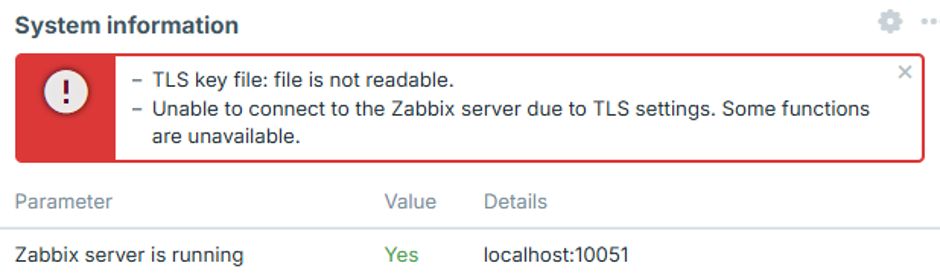
Webサーバーユーザーに、zabbix.conf.phpで設定されている1つ以上の証明書、キー、またはCAファイルを読み取るための十分な権限がありません。
これは、証明書ファイルが /root/ やユーザーのホームディレクトリなど、アクセスが制限されたディレクトリに保存されている場合に発生することがあります。
証明書ファイルをWebサーバーがアクセスできるディレクトリに移動し、設定の手順2で説明されているように適切な権限を設定してください。
TLSファイルが無効または破損している
Webインターフェースに「TLS設定が原因でZabbixサーバーに接続できません。 一部の機能は利用できません。」と表示される場合があります。
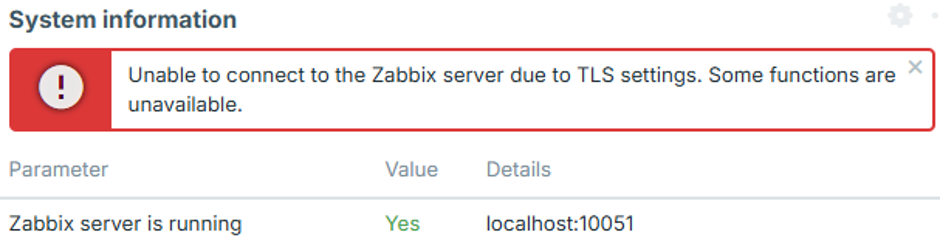
設定された証明書ファイルまたはキー ファイルが存在し、読み取り可能であっても、その内容が空、破損、またはその他の理由で無効な場合に発生することがあります。 この場合、WebインターフェースはZabbixサーバーへの接続を確立せず、Zabbixサーバーのログにも対応する接続試行は記録されません。
証明書ファイルとキーファイルに、有効で適切にフォーマットされたデータが含まれていること、および秘密鍵が証明書に対応していることを確認してください。