Push-уведомление
Этот тип носителя позволяет серверу Zabbix отправлять push-уведомления в мобильное приложение Zabbix на вашем мобильном устройстве.
Настройка
При создании типа носителя выберите Push в поле Type:
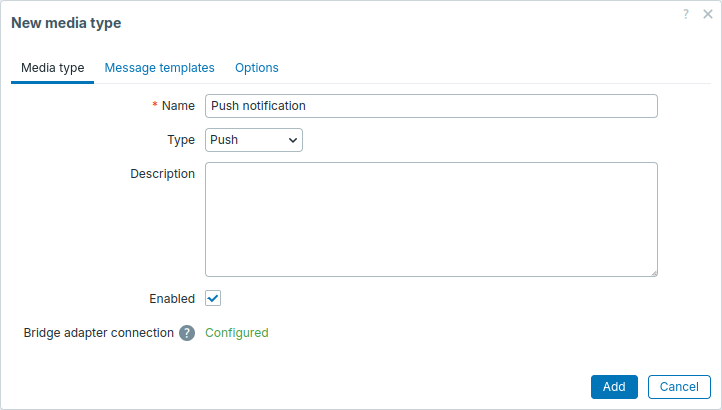
Форма настройки содержит общие параметры, шаблоны сообщений и опции типа носителя.
В форме также отображается, настроен ли адаптер моста Zabbix.
Если адаптер не настроен, вы всё равно можете создать тип носителя, но он не будет работать.
После создания и включения типа носителя добавьте устройство пользователю, чтобы автоматически добавить тип носителя этому пользователю (или добавьте носитель пользователя вручную). Это позволит пользователю получать push-уведомления на мобильном устройстве.
Тестирование
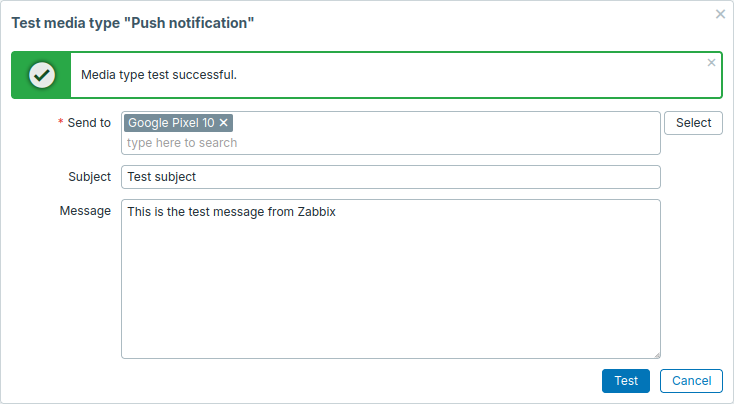
Чтобы проверить работу этого типа носителя:
- Найдите тип носителя в списке типов носителей.
- Нажмите Тест в последнем столбце списка, чтобы открыть форму тестирования.
- В поле Отправить на выберите устройство.
- Нажмите Тест, чтобы отправить тестовое push-уведомление на выбранное устройство.
В этом же окне появится сообщение об успешной или неуспешной отправке: