
Pre-elaborazione da CSV a JSON
Panoramica
In questo passaggio di pre-elaborazione è possibile convertire i dati di un file CSV nel formato JSON. È supportato in:
- item (prototipi di item)
- regole di discovery di basso livello
Configurazione
Per configurare un passaggio di pre-elaborazione da CSV a JSON:
- Vai alla scheda Preprocessing nella configurazione di item/discovery rule.
- Fai clic su Add.
- Seleziona l'opzione CSV to JSON.
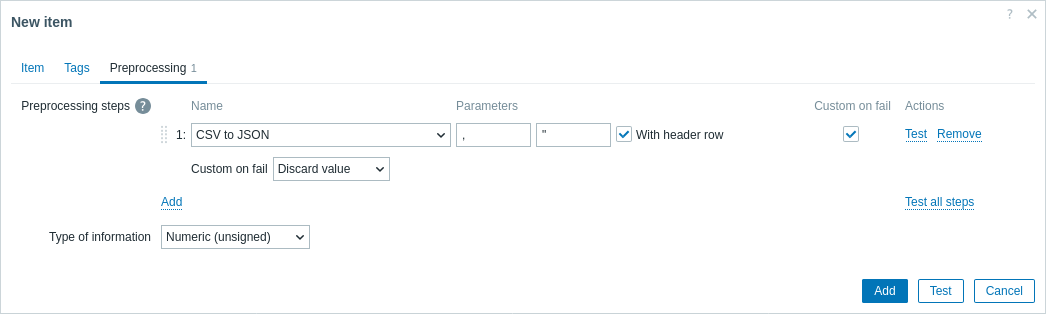
Il primo parametro consente di impostare un delimitatore personalizzato. Se la prima riga dell'input CSV inizia con "Sep=" ed è seguita da un singolo carattere UTF-8, tale carattere verrà utilizzato come delimitatore nel caso in cui il primo parametro non sia impostato. Se il primo parametro non è impostato e non viene recuperato alcun delimitatore dalla riga "Sep=", verrà utilizzata una virgola come separatore.
Il secondo parametro opzionale consente di impostare un simbolo di virgolette.
Se la casella di controllo With header row è selezionata, i valori della riga di intestazione verranno interpretati come nomi delle colonne (per ulteriori informazioni, vedere Elaborazione dell'intestazione).
Se la casella di controllo Custom on fail è selezionata, l'item non passerà allo stato non supportato in caso di errore durante un passaggio di pre-elaborazione. È inoltre possibile impostare opzioni personalizzate per la gestione degli errori: eliminare il valore, impostare un valore specificato oppure impostare un messaggio di errore specificato.
Header processing
The CSV file header line can be processed in two different ways:
- If the With header row checkbox is marked - header line values are interpreted as column names. In this case the column names must be unique and the data row should not contain more columns than the header row;
- If the With header row checkbox is not marked - the header line is interpreted as data. Column names are generated automatically (1,2,3,4...)
CSV file example:
Nr,Item name,Key,Qty
1,active agent item,agent.hostname,33
"2","passive agent item","agent.version","44"
3,"active,passive agent items",agent.ping,55
A quotation character within a quoted field in the input must be escaped by preceding it with another quotation character.
Processing header line
JSON output when a header line is expected:
[
   {
      "Nr":"1",
      "Item name":"active agent item",
      "Key":"agent.hostname",
      "Qty":"33"
   },
   {
      "Nr":"2",
      "Item name":"passive agent item",
      "Key":"agent.version",
      "Qty":"44"
   },
   {
      "Nr":"3",
      "Item name":"active,passive agent items",
      "Key":"agent.ping",
      "Qty":"55"
   }
]
No header line processing
JSON output when a header line is not expected:
[
   {
      "1":"Nr",
      "2":"Item name",
      "3":"Key"
      "4":"Qty"
   },
   {
      "1":"1",
      "2":"active agent item",
      "3":"agent.hostname"
      "4":"33"
   },
   {
      "1":"2",
      "2":"passive agent item",
      "3":"agent.version"
      "4":"44"
   },
   {
      "1":"3",
      "2":"active,passive agent items",
      "3":"agent.ping"
      "4":"55"
   }
]