
3 カスタムアラートスクリプト
概要
アラート送信に既存のメディアタイプが適していない場合、別の方法があります。
通知を独自の方法で処理するスクリプトを作成できます。
カスタムアラートスクリプトは Zabbix サーバー上で実行されます。
これらのスクリプトは、サーバー設定ファイルの AlertScriptsPath パラメータで指定されたディレクトリに配置する必要があります。
以下は、カスタムアラートスクリプトの例です。
#!/bin/bash

to=$1
subject=$2
body=$3
host=$4
value=$5

cat <<EOF | mail -s "$subject" "$to"
$body

Host: $host
Value: $value
EOF
Zabbix は、実行されたコマンドおよびスクリプトの終了コードを確認します。
0 以外の終了コードは、コマンド実行 エラーとして扱われます。
このような場合、Zabbix は失敗した実行を再試行します。
環境変数はスクリプトに対して保持も作成もされないため、明示的に扱う必要があります。
設定
カスタムアラートスクリプトをメディアタイプとして設定するには、次の手順を実行します。
- アラート → メディアタイプ に移動します。
- メディアタイプの作成 をクリックします。
メディアタイプ タブには、メディアタイプの一般的な属性が含まれます。
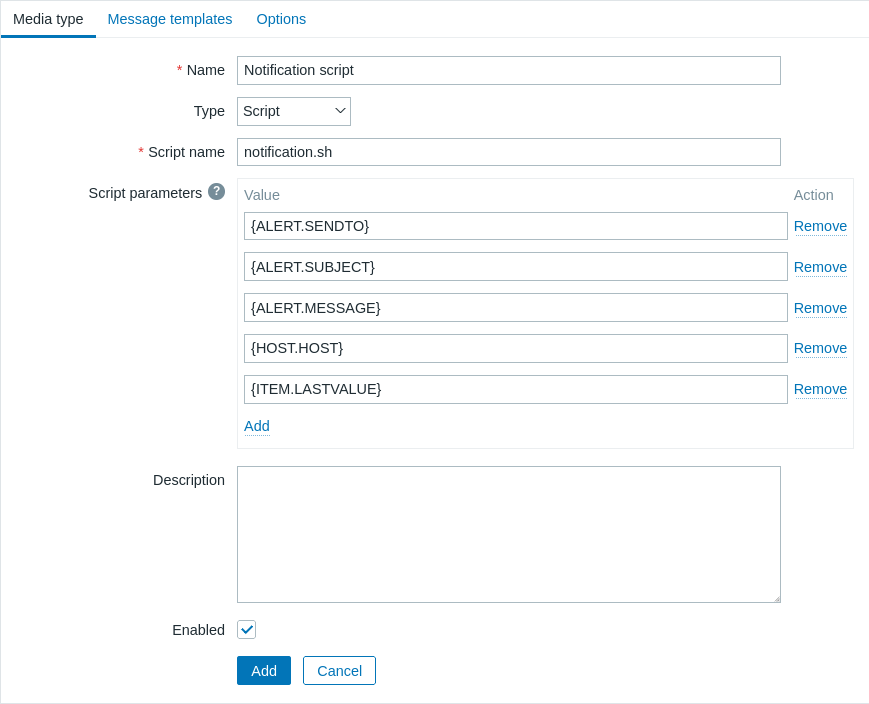
必須入力フィールドには、赤いアスタリスクが付いています。
スクリプトメディアタイプに固有のパラメータは次のとおりです。
| Parameter | Description |
|---|---|
| Script name | サーバー設定パラメータ AlertScriptsPath で指定されたディレクトリにあるスクリプトファイル名(例: notification.sh)を入力します。 |
| Script parameters | オプションのスクリプトパラメータを追加します。これらは、定義された順序でコマンドライン引数としてスクリプトに渡されます。 Script parameters は {ALERT.SENDTO}、{ALERT.SUBJECT}、{ALERT.MESSAGE} マクロ、および通知でサポートされるすべての マクロ、さらに ユーザーマクロ をサポートします。 |
デフォルトメッセージと障害処理オプションの設定方法については、共通メディアタイプパラメータ を参照してください。
アラートスクリプトがデフォルトメッセージを使用しない場合でも、このメディアタイプで使用される操作タイプのメッセージテンプレートは定義されている必要があります。 定義されていない場合、通知は送信されません。
複数のスクリプトメディアタイプが設定されている場合、これらのスクリプトはアラート処理プロセスによって並列に処理されることがあります。
アラート処理プロセスの総数は、サーバー設定ファイルの StartAlerters パラメータによって制限されます。
テスト
設定済みのスクリプトメディアタイプをテストするには、次の手順を実行します。
-
メディアタイプの 一覧 から、対象のスクリプトを見つけます。
-
一覧の最後の列にある Test をクリックします。テスト用フォームがポップアップウィンドウで開きます。 テスト用フォームには、スクリプトメディアタイプに設定されているのと同じ数のパラメータが表示されます。
-
必要に応じて、スクリプトのパラメータ値を編集します。編集内容はテスト手順にのみ反映され、実際の値は変更されません。
-
Test をクリックします。
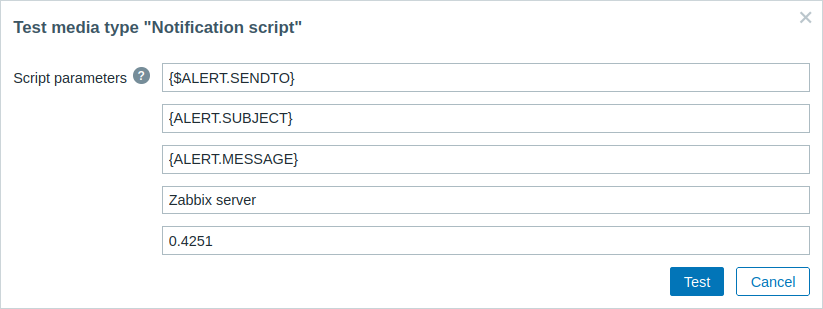
設定済みのスクリプトメディアタイプをテストする場合、{ALERT.SENDTO}、{ALERT.SUBJECT}、{ALERT.MESSAGE} およびユーザーマクロはそれぞれの値に展開されます。 ただし、イベントに関連するマクロ(例: {HOST.HOST}、{ITEM.LASTVALUE} など)は、テスト時には詳細を取得する関連イベントがないため、展開されません。 {ALERT.SUBJECT} および {ALERT.MESSAGE} 内のマクロも展開されないことに注意してください。 たとえば、{ALERT.SUBJECT} の値が "Problem: {EVENT.NAME}" で構成されている場合、{EVENT.NAME} マクロは展開されません。
ユーザーメディア
メディアタイプを設定したら、Users → Users セクションに移動し、このメディアタイプをユーザーに割り当ててユーザープロファイルを編集します。 すべてのメディアタイプに共通するユーザーメディアの設定手順については、Media types ページを参照してください。
ユーザーメディアを定義する際、Send to フィールドを空にすることはできません。 このフィールドがアラートスクリプトで使用されない場合は、検証要件を回避するために、サポートされている文字の任意の組み合わせを入力してください。