
Źródło danych
Przegląd
Sekcja Administracja > Źródło danych umożliwia określenie źródła danych telemetrycznych, czyli bazy danych przechowującej dane telemetryczne (ślady, metryki i logi). Dane telemetryczne są używane do monitorowania wydajności aplikacji (APM), co pomaga sprawdzać przepływ żądań przez aplikacje i usługi, mierzyć ich wydajność oraz znajdować przyczynę powolnych lub nieudanych operacji.
Źródło danych telemetrycznych musi obsługiwać OpenTelemetry.
Źródło danych telemetrycznych określone w tej sekcji jest nazywane globalnym źródłem danych, ponieważ jest współdzielone przez serwer Zabbix, proxy i frontend. Można jednak zastąpić je dla dowolnego z tych komponentów, określając inne źródło danych telemetrycznych w konfiguracji serwera, proxy lub frontendu.
Pozycja zapytanie telemetryczne odpytuje to źródło danych, chyba że w konfiguracji komponentu określono inne źródło.
APM
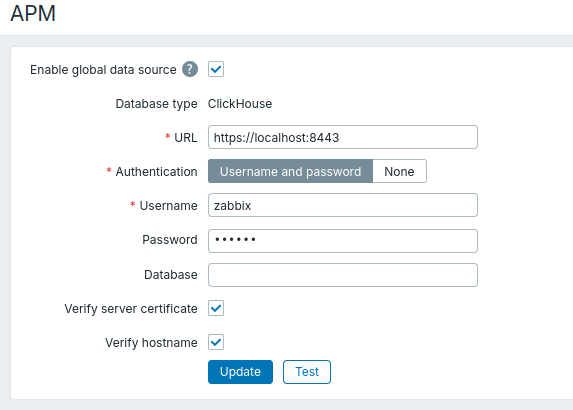
Aby określić globalne źródło danych, zaznacz pole wyboru Włącz globalne źródło danych i wypełnij opisane poniżej parametry. Przed zapisaniem możesz kliknąć Testuj, aby sprawdzić połączenie z tym źródłem danych (wymaga rozszerzenia php-curl).
| Parametr | Opis |
|---|---|
| Typ bazy danych | Typ bazy danych jest na stałe ustawiony na ClickHouse i nie można go zmienić. Zobacz także: Wymagania oraz Konfiguracja ClickHouse. |
| URL | Wprowadź adres URL HTTP lub HTTPS używany do łączenia się z bazą danych. |
| Uwierzytelnianie | Wybierz metodę uwierzytelniania używaną do logowania się do bazy danych: Nazwa użytkownika i hasło lub Brak. |
| Nazwa użytkownika | Określ nazwę użytkownika używaną do logowania się do bazy danych. Ten parametr jest dostępny, jeśli dla opcji Uwierzytelnianie ustawiono wartość Nazwa użytkownika i hasło. |
| Hasło | Określ hasło używane do logowania się do bazy danych lub pozostaw pole puste, jeśli użytkownik bazy danych nie ma hasła. Hasło jest resetowane po zmianie adresu URL. Ten parametr jest dostępny, jeśli dla opcji Uwierzytelnianie ustawiono wartość Nazwa użytkownika i hasło. |
| Baza danych | Wprowadź nazwę bazy danych zawierającej dane telemetryczne. Jeśli pole pozostanie puste, Zabbix użyje domyślnej bazy danych skonfigurowanej w ClickHouse dla użytkownika. |
| Weryfikuj certyfikat serwera | Zaznacz pole wyboru, aby zweryfikować certyfikat serwera. Jeśli pole jest zaznaczone, powiązane opcje TLS muszą być ustawione w konfiguracji serwera, proxy lub frontend. Ten parametr jest dostępny, jeśli opcja URL zawiera adres URL HTTPS. |
| Weryfikuj nazwę hosta | Zaznacz pole wyboru, aby sprawdzić, czy nazwa hosta w opcji URL odpowiada nazwie hosta w certyfikacie serwera. Jeśli pole jest zaznaczone, powiązane opcje TLS muszą być ustawione w konfiguracji serwera, proxy lub frontend. Ten parametr jest dostępny, jeśli opcja URL zawiera adres URL HTTPS. |